onelife

How do you express personality on a website using micro interactions?

COMPANY

EXPERTISE
Micro Interaction
ux
UI
ROLE

UX Designer

EXPERTISE
Micro interaction
UX
UI

The Project

The Project

The Project

Adding motion and refocusing site goals increase efficiency and use of employee benefits site.

Background

OneLife is a portal for employees all over the world to access company-provided health, financial and growth information. The previous site was difficult to update and contained a myriad of content that was irrelevant to the global audience. The company wished to cut costs by updating the site themselves rather than paying an outside vendor for upkeep of the existing site.

Celanese employees spread across three continents were the main userbase of this project. The new site needed to help employees quickly weed through an abundance of information in a more efficient manner.

The Challenge

The Challenge

The Challenge

Applying motion design to enhance the user experience.

The Process

The Process

The Process

Redesigned OneLife portal for global employees using motion design and improved navigation, enhancing efficiency and saving $100,000 in two years.

Research & Planning

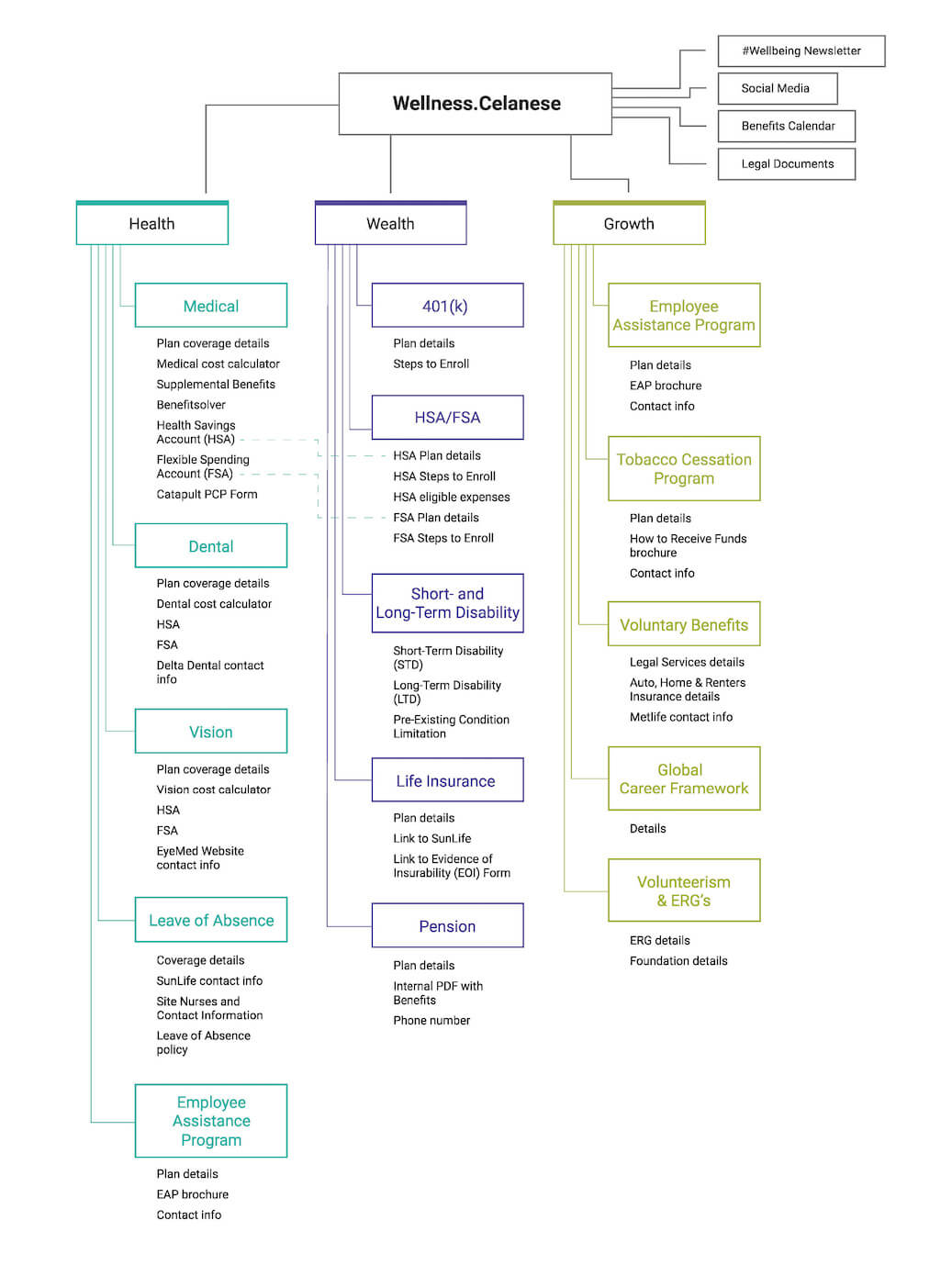
The project began by hearing from Celanese employees across three continents, who struggled with an outdated, hard-to-navigate site filled with irrelevant content. The goal was to enable the company to manage the site internally, cutting costs associated with outside vendors. Understanding these requirements, we planned a new, more efficient site architecture to simplify navigation.

Design & Prototyping

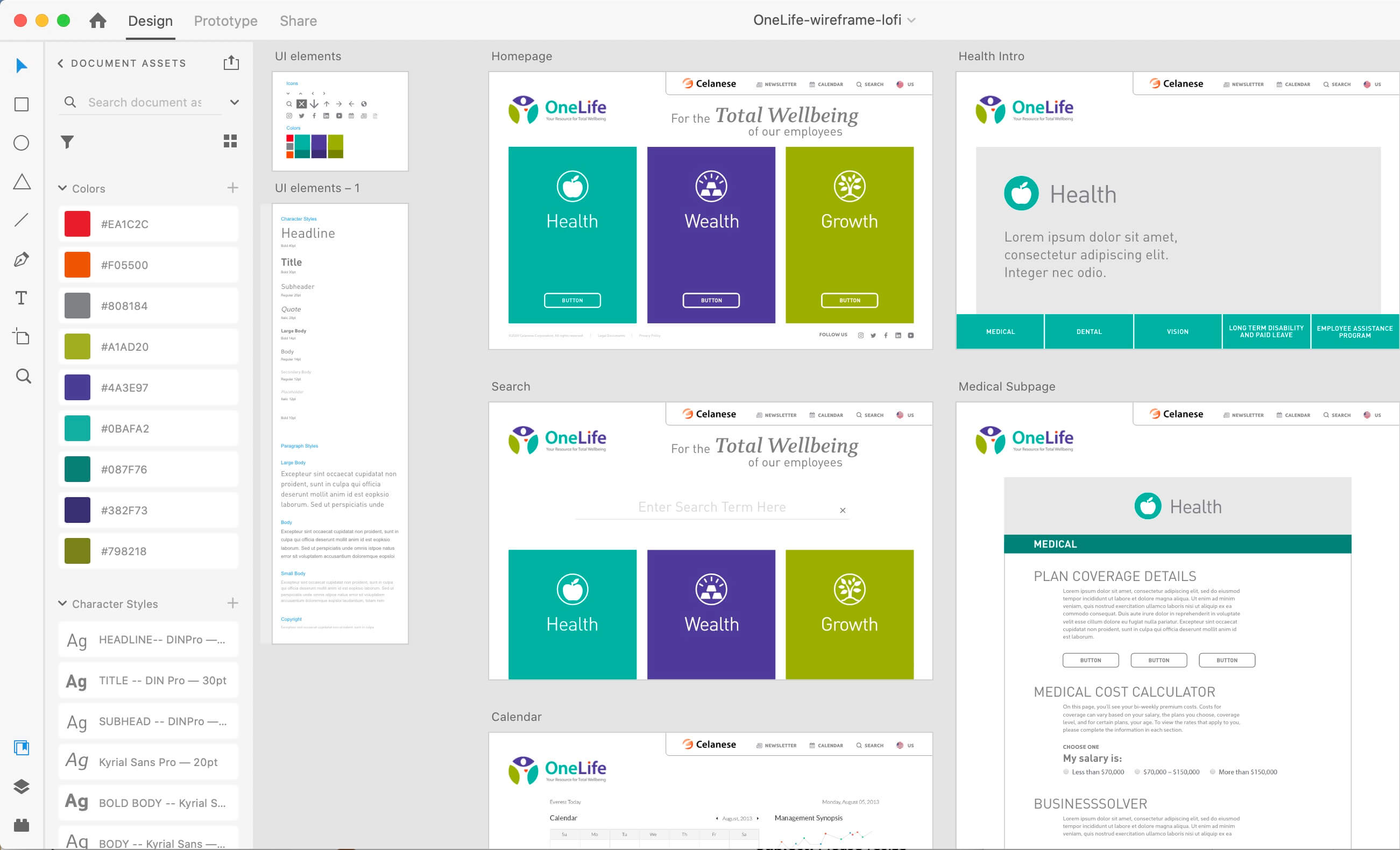
In the design phase, we used UI animations on the welcome screen to engage users and encourage exploration of the site’s sections, branded with icons and labels. Collaborating with a copywriter ensured the messaging and user experience were spot-on. A significant addition was the animated chatbot "Hi Chemi," designed in After Effects to assist users after periods of inactivity. These micro interactions were prototyped to enhance user engagement and site personality.

Development & Implementation

During development, I collaborated closely with developers to ensure a smooth transition from design to implementation. The simplified site architecture allowed users to find needed information within three taps. High fidelity wireframes were provided, incorporating distinct colors for Health, Wealth, and Growth sections, and quick links were added to streamline access to specific benefits and contact information. Regular check-ins and iterative feedback loops ensured the design elements were seamlessly integrated and functioned as intended.

Testing & Optimization

The final phase involved testing the new site to ensure it met user needs and functioned efficiently. The redesigned OneLife portal successfully allowed employees to navigate and find information quickly, enhancing overall user satisfaction. The project was completed in just two months, and by bringing the design in-house, the company saved $100,000 over two years. Continuous feedback and adjustments ensured the site maintained its effectiveness and user-friendliness.
  • What where

    Improved navigation, intentional color scheme, animations and other strategies were used to create a more efficient user experience. Simplified site architecture allowed the user to arrive at any needed information in a maximum of three taps.

  • high fidelity wireframing

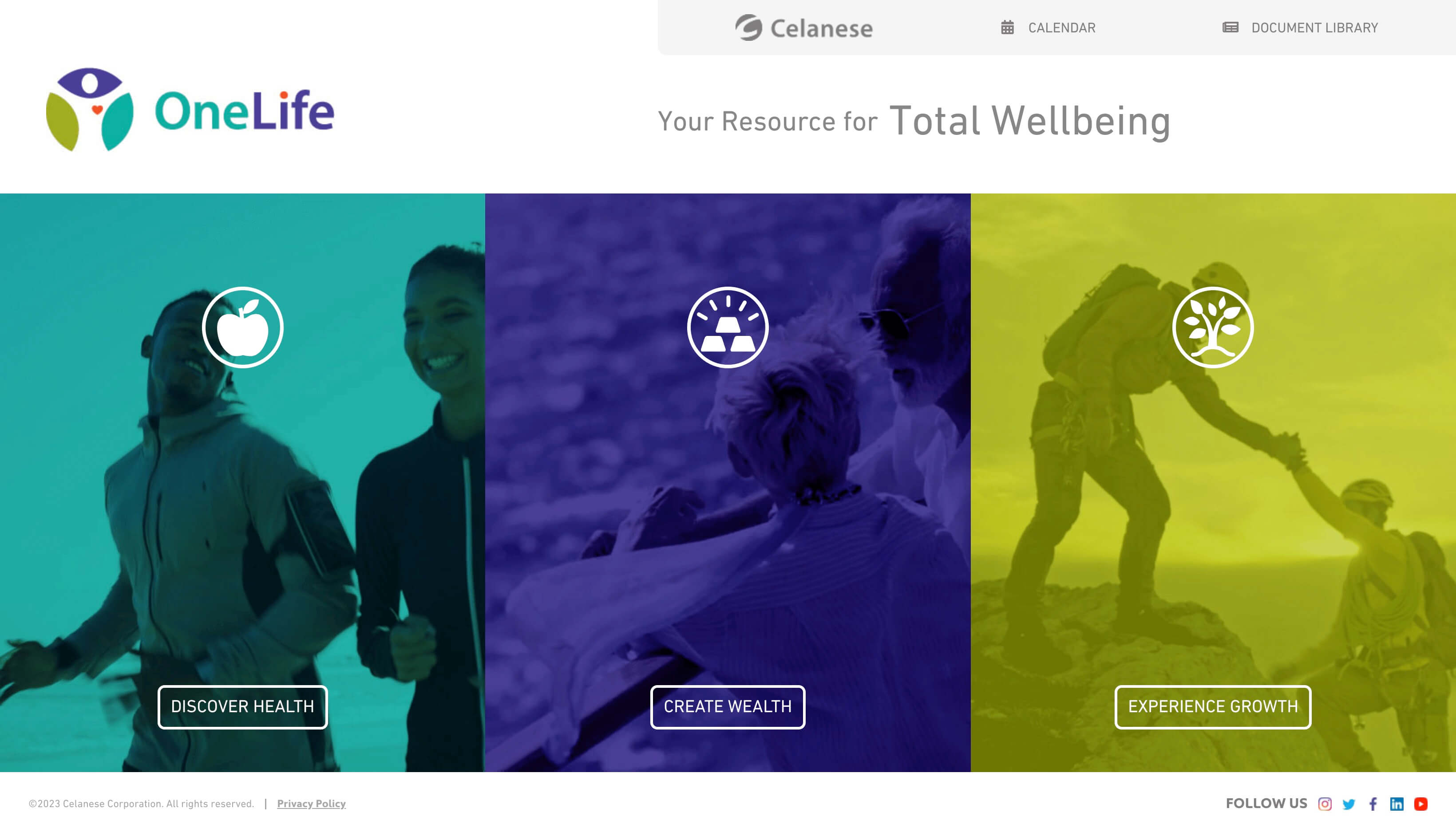
    Colors were implented to differentiate between Health, Wealth, and Growth at first glance. Quicklinks were added to ensure information and contact info for each particular benefit is found in less clicks than before.

  • total wellbeing

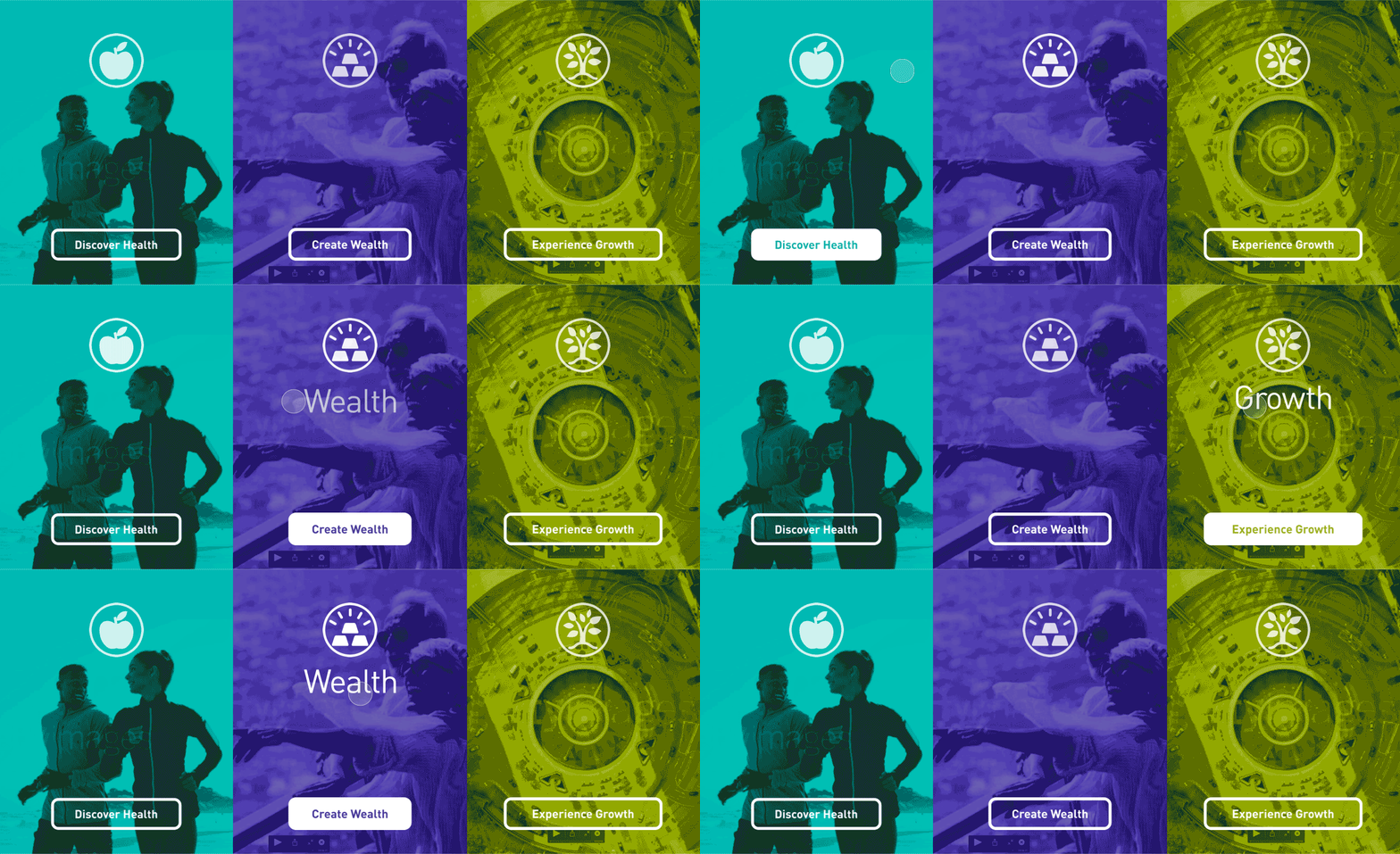
    UI animations used on the welcome screen invite the user to interact and explore the content in each section. The three icons shown here (the apple, gold, and tree) are a part of the branding that was rolled out at the same time as the website.

    I collaborated with a copywriter to get the messaging and UX just right.

  • hi chemi

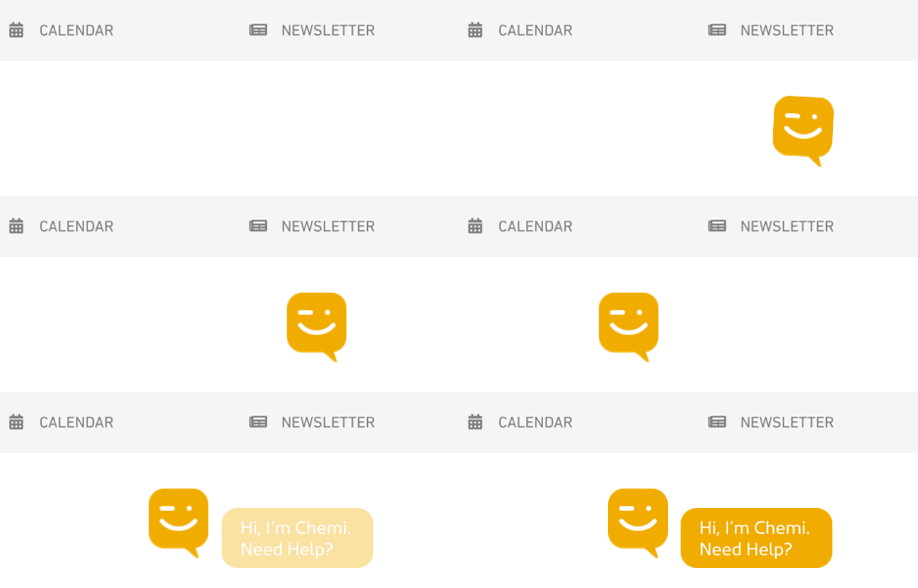
    I designed a “face” for this chatbot. I created this animation in After Effects for use on this website. The chatbot displays after so many seconds of inactivity to ask the user if they need assistance.

  • What where

    Improved navigation, intentional color scheme, animations and other strategies were used to create a more efficient user experience. Simplified site architecture allowed the user to arrive at any needed information in a maximum of three taps.

  • high fidelity wireframing

    Colors were implemented to differentiate between Health, Wealth, and Growth at first glance. Quicklinks were added to ensure information and contact info for each particular benefit is found in less clicks than before.

  • total wellbeing

    UI animations used on the welcome screen invite the user to interact and explore the content in each section. The three icons shown here (the apple, gold, and tree) are a part of the branding that was rolled out at the same time as the website.

    I collaborated with a copywriter to get the messaging and UX just right.

  • hi chemi

    I designed a “face” for this chatbot. I created this animation in After Effects for use on this website. The chatbot displays after so many seconds of inactivity to ask the user if they need assistance.

  • What where

    Improved navigation, intentional color scheme, animations and other strategies were used to create a more efficient user experience. Simplified site architecture allowed the user to arrive at any needed information in a maximum of three taps.

  • high fidelity wireframing

    Colors were implemented to differentiate between Health, Wealth, and Growth at first glance. Quicklinks were added to ensure information and contact info for each particular benefit is found in less clicks than before.

  • total wellbeing

    UI animations used on the welcome screen invite the user to interact and explore the content in each section. The three icons shown here (the apple, gold, and tree) are a part of the branding that was rolled out at the same time as the website.

    I collaborated with a copywriter to get the messaging and UX just right.

  • hi chemi

    I designed a “face” for this chatbot. I created this animation in After Effects for use on this website. The chatbot displays after so many seconds of inactivity to ask the user if they need assistance.

The Results 🎯

The Results 🎯

The Results 🎯

Due to designing this in-house, the company saved $100,000 over the course of two years.

The UX research, site architecture, low and high fidelity wireframes, and UI animations were accomplished in just two months.

© 2024 – Trevor Goodman

© 2024 – Trevor Goodman

© 2024 – Trevor Goodman